


AI Piano Magic Keyboard
4.1197.00 Reviews
App Specs
- Version
- 67.0
- Updated On
- License
- Free
- Downloads
- 10,000,000+
- Developer
- GambiSoftVn
- Categories
- Music & Audio
- Platform
- Android, iOS
Screenshots
 Analysis by AppCompare
I approach AI Piano Magic Keyboard less as a replacement for a piano teacher and more as a low-pressure way to explore songs and get comfortable with a keyboard. That distinction matters: an on-screen instrument can make starting feel easy, but it cannot give your hands the feel of real keys. The app is a free music and audio app from GambiSoftVn, and its central appeal is learning through familiar songs rather than beginning with theory alone.
Reading the screen and finding your way
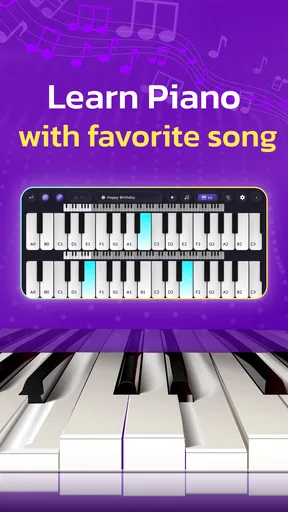
From my perspective, the song-led approach can make piano practice easier to enter than a traditional lesson app that starts with notation or exercises. Color-coded guidance offers a visual cue for what to play, which may help someone who does not yet read sheet music. It also gives a returning player a quick way to follow along without spending the whole session deciphering a score.
That visual help is not the same as a full accessibility solution. A person who needs large text, strong contrast, screen-reader support, or a highly customizable interface should check whether the current app works for them before relying on it. A keyboard with many keys can also feel visually busy on a phone, so I would try a short lesson first and see whether the notes and controls remain easy to distinguish on my device.
Different hands, different ways of learning
Guided songs and a pace that can adapt to a learner may reduce the pressure to keep up with a fixed class. That is useful if you are new to piano, have a little time between other tasks, or prefer learning by trying a melody rather than studying a page of exercises. Recording a performance can add another kind of feedback: you can listen back and notice whether a passage sounds steady, even if you are not yet sure how to judge it while playing.
Touchscreen piano playing still asks for repeated, deliberate taps. If your hands tire easily, your movements are limited, or precise finger placement is difficult, an on-screen keyboard may become frustrating rather than helpful. I would treat the phone version as a flexible practice aid, not assume that its guidance removes the physical demands of playing. Taking short sessions and choosing a simple passage can make experimentation more manageable.
When a phone piano fits into real life
The clearest use case is an informal practice window: perhaps you have ten minutes while waiting at home and want to try the chorus of a song instead of opening a full instrument setup. You can work through a guided part, record it, then replay the recording to decide what to revisit next time. That small loop—play, listen, pick one thing to improve—is more useful than tapping through a song once and moving on.
There is a practical trade-off between portability and playing comfort. A phone is easy to keep close, but its screen gives your fingers less room than a real keyboard. If you are practicing in a shared room, sound may also be a consideration; headphones can help if the device supports them, but I would check the sound and connection setup on your own device rather than assume every arrangement behaves the same. For longer sessions or work on hand position, a physical keyboard is the better tool.
Worth Reading Before You Choose

EA SPORTS FC Mobile 26 Is a Bigger Football Game, but It Takes Time

Flipboard Shows What News Apps Must Do Beyond the Feed

Switching to Android Auto Means Rethinking Your Driving Routine

Google Calendar Makes a Crowded Week Easier to Manage

Ludo King Makes the Most of the Minutes Between Plans

Baby Panda World Brings Quick Play to Modern Phones, but Its Game Library Feels Busy
Who is likely to enjoy it—and who may not
I would recommend trying it if you want a casual, song-centered introduction, like visual prompts, and do not want to begin by buying a piano. It can also suit someone who already plays a little and wants a convenient way to revisit melodies away from an instrument. Its Everyone content rating makes it suitable for a broad audience, though younger learners may still benefit from an adult helping them choose songs and manage time on a device.
I would steer away if your priority is formal piano technique, dependable music-reading instruction, or a realistic sense of key weight and spacing. A dedicated lesson course may be a better fit for structured progression, while a hardware keyboard is more useful for developing touch and coordination. Those alternatives ask for more commitment or equipment, but they address goals a phone app cannot fully replace.
Getting to Know AI Piano Magic Keyboard
First things first, let's talk about what this app actually does. Picture a virtual piano keyboard that adapts to your musical skills. Whether you're a beginner or a seasoned pianist, AI Piano Magic Keyboard has something to offer. It's designed to enhance your playing experience by using artificial intelligence to guide your fingers across the keys.
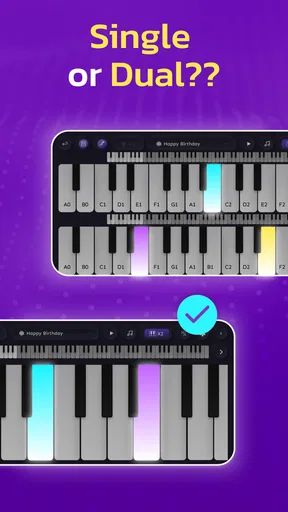
The interface is pretty slick. You get a full 88-key piano keyboard on your screen, which is awesome for an app. There's a neat feature where you can switch between different instruments, so if you're feeling like Mozart one minute and a rock star the next, you're covered.
Features That Hit the Right Note
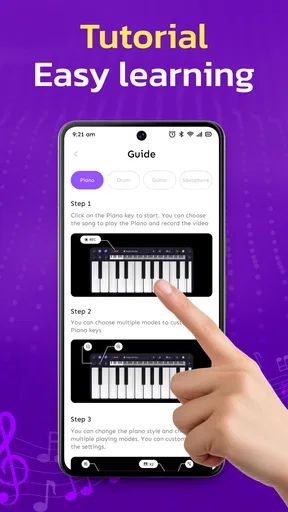
One of the coolest things about this app is its AI-driven tutorials. It’s like having a personal music teacher right at your fingertips. The tutorials are intuitive and adjust according to your learning pace. So, there's no pressure to keep up; you learn at your own speed.
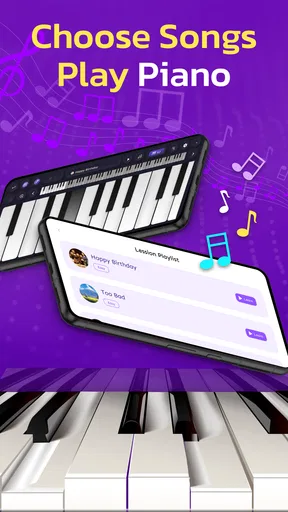
The app also comes with a library of songs ranging from classical to pop. You can learn to play your favorite tracks with guided sheet music, which is color-coded to ensure you hit all the right notes. I found this particularly helpful because it takes the guesswork out of reading music.
Oh, and did I mention the recording feature? You can record your performances and listen back. This is perfect for tracking your progress or sharing your new skills with friends.
The User Experience
Jumping into the app is straightforward with a user-friendly setup. The design is clean, and navigation is a breeze. The developers clearly put a lot of thought into making it accessible for all users, whether you're tech-savvy or not.
Performance-wise, the app runs smoothly with no noticeable lag, which is crucial when you're trying to keep up with a song. The sound quality is surprisingly good for a mobile app, too. It almost feels like you’re playing on a real piano.
What I Loved and What Could Be Better
One of the things I really loved about AI Piano Magic Keyboard is the personalization aspect. It feels like the app is genuinely tailored to fit your musical journey. The AI learns from your playing habits and offers suggestions to improve your skills, which is both impressive and helpful.
However, like most apps, there’s always room for improvement. While the song library is extensive, it could benefit from more frequent updates to include the latest hits. Also, some users might find the in-app purchases a bit on the pricey side, especially if you're looking to unlock premium features.
Practical trade-offs before you settle into a routine
Because the app presents a full keyboard on a small screen, I would not use every session to chase speed. A more useful habit is to choose one short phrase, slow down enough to place each finger deliberately, and only then try to follow the song at its normal pace. That keeps the visual prompts from turning into a race and gives the recording feature a clear purpose: compare one attempt with the next, rather than judging yourself against a polished performance.
For a beginner, it is reasonable to wonder whether guided songs teach enough to become a pianist. I see them as a motivating entry point, not a complete curriculum. They can help build familiarity with notes and timing through repetition, but anyone who wants to understand music reading, posture, fingering, and technique in depth should pair the app with lessons or another structured method. If the goal is simply to enjoy learning recognizable melodies, that limitation may not matter.
It is also worth thinking about how you will use the app before making it part of a daily routine. If you have only a phone and short breaks, portability is a real advantage. If you already own a keyboard, use the app to review a song idea away from it, then move back to the physical keys for longer practice. That combination makes better use of each tool than expecting a touchscreen to reproduce the feel of an instrument.
Availability and a sensible first test
The app is free to install, is rated 4.1 on average from around 114,000 ratings, and has passed 10 million installs. It is rated for Everyone and was released on March 25, 2025; version 67.0 requires Android 6.0 or later. Those figures suggest it has reached a broad audience, but they do not tell me whether its visual approach suits a particular learner. I would start with one short lesson and test the screen, sound, and touch response on the device you actually plan to use.
That first test can answer practical questions better than a long session: can you find a song without hunting through menus, distinguish the guided notes comfortably, and replay a recording in a way that helps you? If one of those steps feels awkward, try changing the device orientation or moving to a larger screen if the app supports your setup. If it still feels cramped, that is a useful sign to choose a different learning method rather than forcing the phone to do a keyboard’s job.
Wrapping It Up
Overall, AI Piano Magic Keyboard is a fantastic app for anyone looking to explore the world of music. Whether you’re a beginner eager to learn or a seasoned player wanting to refine your skills, this app offers a fun and engaging way to play the piano. With its AI-driven technology, user-friendly interface, and a wide range of features, it’s definitely worth checking out.
If you're ready to turn your smartphone into a musical powerhouse, this app is just a download away. Happy playing!
Pros
- Intuitive interface for easy navigation.
- Wide range of sound effects available.
- Supports MIDI for professional use.
- Adjustable sensitivity for better control.
- Free version offers ample features.
Cons
- Ads can be intrusive at times.
- Limited free sound presets available.
- Occasional lag on older devices.
- In-app purchases can be pricey.
- Requires internet for full functionality.
FAQs for AI Piano Magic Keyboard
What is AI Piano Magic Keyboard and how does it work?
AI Piano Magic Keyboard is an interactive music app that transforms your device into a virtual piano. Using AI technology, it offers real-time feedback and guidance as you play. The app is designed for users of all skill levels, providing tutorials, sheet music, and interactive lessons to help you learn and improve your piano skills.
Is AI Piano Magic Keyboard suitable for beginners?
Yes, AI Piano Magic Keyboard is perfect for beginners. The app offers step-by-step tutorials and lessons that cater to novice players. Its AI-driven guidance system helps you learn at your own pace, making it easy to grasp basic concepts and gradually advance to more complex pieces and techniques.
Does AI Piano Magic Keyboard require an internet connection to use?
While an internet connection is necessary to download the app and access certain features, such as online tutorials and additional song libraries, many core features of AI Piano Magic Keyboard can be used offline. This includes basic lessons, practice modes, and playing pre-downloaded songs.
Are there any in-app purchases or subscriptions in AI Piano Magic Keyboard?
AI Piano Magic Keyboard offers a range of in-app purchases and subscription options. While the basic features are free, premium content such as advanced lessons, additional song libraries, and personalized feedback require a subscription. This allows for a more enriched learning experience tailored to your needs.
Can I connect a physical piano or keyboard to AI Piano Magic Keyboard?
Yes, AI Piano Magic Keyboard supports MIDI connectivity, allowing you to connect a physical piano or keyboard to the app. This feature enables a more authentic playing experience, letting you practice and receive feedback on a real instrument while utilizing the app’s interactive features.


